Unreal Engine crash report triage: group crashes by callstack and track regressions
For leads, QA and programmers who receive Unreal crash reports and need to decide what to fix first. It explains how reports are grouped by callstack, why some crashes split into several groups, how the AI explanation of a callstack helps you read a crash you have never seen, how a crash becomes a bug, how the build changelist is worked out, and when a fixed bug reopens by itself. It ends with what is kept, for how long, and what is never stored.
Hundreds of crash reports, and no idea which ones matter
Once crash reporting works, the next problem is volume. A QA pass on a new build can produce dozens of reports in an hour, and most of them are the same few crashes seen on different machines. Reading them one by one does not scale, and a list sorted by date hides the one crash that happens on every level load.
Crash report triage comes down to three questions:
- Which reports are the same crash? That needs a rule that recognizes the same callstack across builds, even when line numbers and addresses change.
- Which crashes already have a bug, and who is on it?
- Did a crash we fixed come back? That needs to know which changelist each build was made from, and compare it with the changelist of the fix.
Unreal Engine gives you the raw material: every report carries the callstack of the crashed thread, an error message, a crash type and a minidump. Grouping and regression tracking have to be built on top.
If you triage by hand, a rule that holds up well is the one below: treat two reports as the same crash when they have the same crash type and the same top few Module!Function frames, ignoring file names, line numbers and addresses. Keep the crash-handling frames out of the comparison, and keep a list of which crash belongs to which bug, with the changelist each bug was fixed in.
How Gameheim groups crash reports by callstack
Every report that reaches Gameheim is filed into a crash group. The Crashes view of the bug tracker lists the groups, not the individual reports, with how many times each crash happened, on how many machines, when it was last seen, the last build and the linked bug.
The grouping rule
Gameheim builds a fingerprint from two things: the crash type and the top of the callstack.
- Crash type, as Unreal reports it: Crash, Assert, Ensure and so on. A
check()failure and anensure()in the same function are two different problems, so they never share a group. - The first 5 frames of the crashed thread in the form
Module!Function. File names and line numbers are dropped, because a line number moves with any edit to the file. Frames of the engine's own crash handling (the assert and exception machinery) are skipped, so the first frame is the one that matters.
Because file and line are ignored, the same crash in build 18342 and build 18410 lands in the same group, as long as the callstack has function names. The group title is the first meaningful function plus the error message.
When the callstack has no function names
A report without symbols only has modules and offsets. Gameheim then groups on module plus offset of the first 5 frames, and marks the group no symbols. An offset is only stable inside one build, so the same crash in the next build creates a new group, and these groups cannot be tracked as regressions. The fix is on the build side: see debug files in the setup guide. If a report has no callstack at all, the group is based on the error message, with numbers and addresses removed.
Editor and game are different groups
The module name is part of every frame. In the editor, code lives in modules such as UnrealEditor-Engine; in a packaged game the same code is usually linked into your game executable. So the same bug crashing in Play In Editor and in a packaged build gives two groups. That is useful: it tells you where the crash was seen. When you want one view, merge the groups, as described below. More on editor reports in Unreal Editor crash reports.
Ensures
Ensures and other non-fatal asserts are accepted and grouped like crashes, always apart from crashes. A new ensure group does not send a notification, so a noisy ensure does not bury real crashes. Use the Type filter (Crashes and asserts or Ensures only) to look at one kind at a time.
Triage by hand and in Gameheim
| Step | By hand | In Gameheim |
|---|---|---|
| Spot reports of the same crash | Compare the top frames of every report | Grouped on arrival by crash type and the first 5 frames |
| Same bug in the editor and in a packaged game | Keep a note that two callstacks are one problem | Merge with another crash, and future reports follow |
| Understand a callstack you have never seen | Read the frames and the engine source around them | AI explanation on the group: what happened, the probable cause, where to look |
| Know which crashes have a bug | Paste report links into bugs and keep a list | Linked bug on each group; Create bug fills in title, message, callstack and changelist |
| Know how many people are hit | Count machines across reports | Machines on each group |
| Check that a fix held | Compare the changelist of new reports with the fix changelist | The bug reopens and a Crash regression notification goes out (Perforce) |
| Old minidumps | Delete them yourself | Deleted after 90 days; each group keeps its last 100 reports |
How to triage Unreal crash reports in Gameheim
A short routine that works for a daily QA pass: look at what is new and frequent, merge what is the same, give every real crash a bug, and let regressions come back to you on their own.
- Crash reception set up for the project, as in Unreal Engine crash reporter setup.
- The permission to read bugs to see crash groups; to write bugs to create or link a bug; to manage the bug tracker to merge groups. See roles and permissions.
Open the Crashes view
Open Bugs, select the project and switch to Crashes, next to List, Board and To resolve. Sort by Occurrences to see the crashes that hit the team most, or by Last seen to see what the latest build brought.
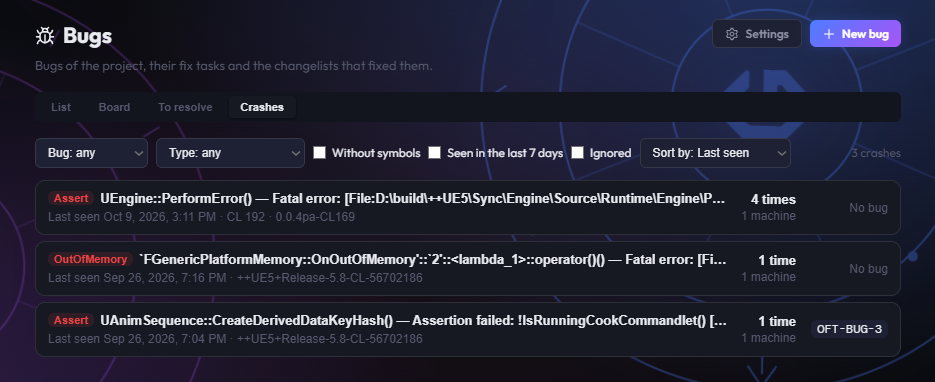
Three crash groups sorted by Last seen: the first happened four times, the last one already has a bug. Narrow the list with the filters: Without a bug for crashes nobody has taken yet, Without symbols to find builds packaged without debug files, Seen in the last 7 days to hide crashes that stopped happening.
Read a crash group
Click a group to open its panel. At the top you see Occurrences, Machines (how many different computers hit it), First seen and Last seen. Below: the Error message, the Callstack (latest report) and the list of reports kept, each with date, changelist, build, engine version, build configuration, whether it came from the editor or the game, and the platform.
Right under the counters, AI explanation gives three short texts written from the callstack: What happened, Probable cause and Where to look. Read it first to decide who should take the crash, then check it against the callstack below. When it is written and what it is based on is covered in the AI explanation section further down.
People with the permission to download crash files also get a link to each report's minidump and to the end of the game log. Open the minidump in Visual Studio with the matching symbols to inspect variables and other threads.
Merge groups that are the same crash
Two groups can be one crash: the editor and game versions of the same bug, or groups without symbols from different builds. In the panel of the group you want to fold in, open Merge with another crash, pick the crash to keep and click Merge into.
The reports and the count move into the kept group, and future reports of the merged crash land there too, so it does not come back as a new group. The kept group keeps its bug; if it had none, it takes the bug of the merged one. A merge cannot be split again, so check the callstacks first.
Create a bug from the crash, or link an existing one
Click Create bug in the group panel. Gameheim creates a bug with severity Crash, the group title as title, the error message and callstack in the symptom, and the changelist of the earliest report as the changelist it was seen in. The minidump stays with the crash group, not in the bug.
If a bug already exists, choose it in Link to an existing bug… and click Link. Unlink removes the link. The bug panel lists its Linked crashes, and the bug history records every link, unlink and merge. From here the bug follows the normal flow described in bug tracking for game development: fix task, fix changelist, verification.
Resolve the bug with its fix changelist
When the fix is submitted, make sure the bug has its fix changelist and is set to Resolved. From that moment Gameheim watches the crash group: if the same crash arrives from a build made at or after the fix changelist, the bug reopens by itself (see regressions below). Reports from builds older than the fix only add to the count.
Reading an Unreal crash report and minidump by hand
Every crash leaves a folder under Saved/Crashes on the machine that crashed. It holds the same files CrashReportClient uploads: CrashContext.runtime-xml, the game or editor log, and UEMinidump.dmp. The context file is plain XML, and a few fields answer most triage questions:
ErrorMessage: the assert text or exception, often with the source file and line of a failedcheck().CallStack: one line per frame,Module!Function() [file:line]when symbols were available, only module names otherwise.CrashType: Crash, Assert, Ensure and so on.EngineVersionandBuildVersion: the engine build, not your game's changelist.
To go further than the callstack, open the minidump in Visual Studio: File > Open > File, pick UEMinidump.dmp, set the symbol paths to the folder that holds the .pdb files of that exact build (and the engine symbols for editor crashes), then choose Debug with Native Only. You get the crashed thread, the other threads and the local variables that the minidump captured.
AI explanation of an Unreal Engine crash callstack
A callstack tells a programmer who knows that code what went wrong. To everyone else it is a list of function names: QA cannot tell whether it is a rendering crash or a save-game crash, and a lead cannot tell who should look at it. Working that out by hand means reading the frames from the top, finding the first one that belongs to your game and not to the engine's crash handling, and reading the engine source around it.
Gameheim does that first read for you. Each crash group has an AI explanation at the top of its panel, written from the crash type, the error message and the callstack of the latest report:
- What happened: the crash in one or two sentences that someone who has not read the callstack can follow.
- Probable cause: the most likely reason, worded as a hypothesis. When the report does not allow a conclusion, the text says so.
- Where to look: the function or module to inspect first, with one or two concrete checks.
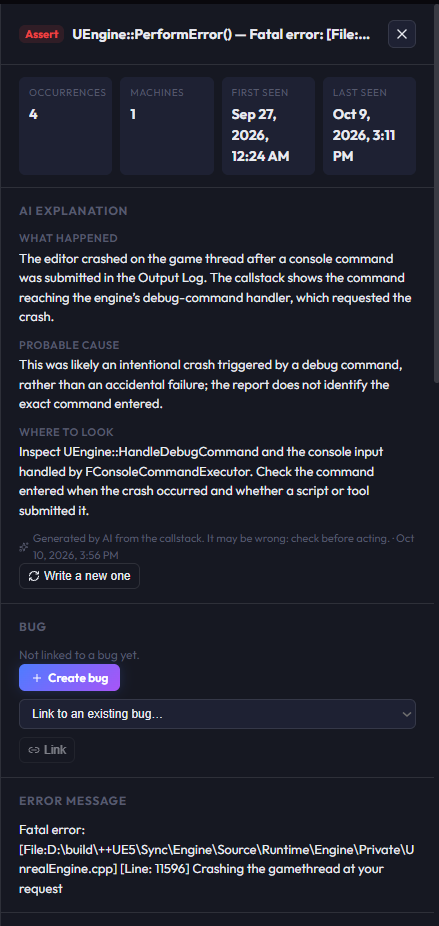
UEngine::PerformError: the crash came from a debug console command, and the text says so.When the explanation is written
- By itself, for a new crash. When a report creates a new group whose callstack has function names, the explanation is requested right away and appears in the panel shortly after. This runs when your organization's plan includes AI, for up to 20 new crashes a day in each project, and until the organization has used half of the AI usage included in its plan for the billing cycle.
- On request. For a crash without an explanation, people whose role includes
ai:useget Explain this crash in the panel. The same people can click Write a new one to replace the text, for example after new reports have arrived: the explanation is written from the latest report and is not rewritten by itself. - Not for crashes without symbols. A group marked no symbols only has modules and offsets, which say nothing about the cause. Package the build with debug files first, as in the setup guide.
Everyone who can read the crash group can read its explanation. The text is always in English, like the callstack it describes. Each explanation counts towards the AI usage included in the plan of the organization and is recorded in the audit log; when that usage is used up for the billing cycle, no new explanation is written and the panel says so.
What the explanation is based on, and its limits
The model receives the structured fields of the latest report and nothing else: crash type, error message, the first 40 lines of the callstack, engine and build version, build configuration, platform, whether it came from the editor or the game, the changelist and the number of occurrences. The minidump, the game log and the machine id are never sent, and the user name in a home path such as C:\Users\name\ is masked first. The full list is in the retention and privacy table below.
That also sets the limit: the model sees the callstack, not your source code and not the memory of the process. It can tell you that a null actor was used in a tick function and which function to open; it cannot tell you which Blueprint spawned the actor. The panel marks the text as generated by AI and possibly wrong. Treat it as the note of a colleague who read the callstack before you: a place to start, to confirm in the debugger with the minidump.
Crash regressions: when a fixed bug reopens
A crash regression is a crash that was fixed and came back. Gameheim detects it when all of these are true:
- the crash group is linked to a bug in Resolved;
- the bug has at least one changelist (with several, the highest one counts as the fix);
- a new report of that group carries a changelist equal to or greater than the fix changelist.
The bug then goes back to Open, not to the status it had before: the fix did not hold, so the work starts again. The bug history shows the status change, made by Crash Reporter, and a Crash regression notification goes to everyone who manages the bug tracker and to the person who reported the bug. Further reports of the same regression do not repeat the notification while the bug stays open.
Where the changelist of a crash comes from
Regressions only work if each report knows which changelist the crashing program was built from. Gameheim works it out in this order, and each report in the panel shows the changelist with its source, build or workspace:
| Source | When it applies | How it works |
|---|---|---|
| workspace | Editor crashes, on a machine running the Gameheim agent | The changelist the crashing machine's Perforce workspace is synced to, reported by the agent. See Unreal Editor crash reports. |
| build, from the Project Version | Packaged builds whose Project Version contains CL<n> | The Project Version is read from the game log inside the package. 0.4.0-CL18342, 1.2-CL_4521 and cl-77 all work. The Project Version is also shown as the build name. |
| build, from the engine build string | Engines compiled by the studio from its own source control | Unreal's BuildVersion ends with -CL-<n>. When the branch is yours, that number is your changelist. |
| build, on Git | Packaged builds whose Project Version contains GIT-<hash> | The commit the build was made from, short (7 characters or more) or full: 0.4.0-GIT-a1b2c3d. The report shows the commit in place of the changelist, and the Project Version is shown as the build name. |
With the engine installed from the Epic Games Launcher, BuildVersion looks like ++UE5+Release-5.8-CL-58210709. That number is Epic's changelist for the engine release, not yours, so Gameheim ignores it on Epic release branches. Without the Project Version convention such a report has no changelist: it is grouped and counted, but it cannot trigger a regression. The fix is to let your packaging script write CL<n> into the Project Version, as shown in the setup guide.
The first report from a packaged build also adds that build to the project's registered builds, under its Project Version and its changelist or commit, marked as coming from a crash report and not yet confirmed. Check the name and the changelist or commit and confirm it, so it counts when Gameheim tells you which builds contain a fix.
Crash notifications
- New crash: when a report creates a new group, everyone who manages the bug tracker in the project is notified. Not for ensures.
- Crash regression: when a resolved bug reopens, as described above.
- Further occurrences of a known crash never notify. Check the Occurrences sort instead.
Crash data retention and privacy
An Unreal crash package contains more than a callstack: identifiers of the machine and of the Epic account, local file paths, and a copy of part of the process memory in the minidump. Gameheim keeps what triage needs and drops the rest as soon as the package is read.
| Data | What Gameheim does |
|---|---|
| Error message, callstack, crash type | Kept with the report |
| Engine version, build (Project Version), build configuration, platform, editor or game, changelist | Kept with the report |
| AI explanation | Written by the AI provider listed among the sub-processors from the crash type, the error message, the first 40 lines of the callstack, versions, build configuration, platform, changelist and occurrences, with the user name in home paths masked. Kept with the group as plain text |
| Minidump | Kept 90 days, then deleted; the report and the group counts stay. Never sent to the AI |
| Game log | Last 256 KB kept, 90 days, like the minidump. It can contain local paths. Never sent to the AI |
| Machine id | Kept only as a one-way hash, different for each project, to count the machines hit. Never sent to the AI |
| User of the Gameheim agent on the crashing machine | Kept only if the project switches on Record who had the crash, and only for editor crashes: see Unreal Editor crash reports. Erased when the option is switched off. Never sent to the AI |
| Windows user name, login id, Epic account id | Not kept |
| IP address of the sender | Not kept; used only for the rate limit |
| Other files of the package | Not kept |
| Reports per group | The last 100; older ones are deleted with their files, the count keeps growing |
Minidumps and logs count towards your organization's storage. When storage is full, new reports are still grouped and counted, only without files. Downloading a minidump or a log needs a separate permission, crash_files in the Bugs group of the role editor, because those files hold process memory and paths. Reading messages and callstacks only needs access to bugs.
Test mode is the one exception: while it is on, up to 10 packages per project are kept exactly as received for 7 days, including the Windows user name and login id. Switch it off when the check is done. Forwarding editor crashes to Epic is the other thing to know about; see Unreal Editor crash reports.
Crash reception is for the editor and internal builds. Since the crash data of your team is personal data in many jurisdictions, let people know that crashes of internal builds are collected, as you would for any internal tool.
Frequently asked questions
How does Gameheim group Unreal crash reports?
By crash type plus the first 5 frames of the crashed thread in the form Module!Function, with file names, line numbers and the engine's crash-handling frames removed. The same crash in two builds with symbols ends up in one group. Without symbols the group is based on module and offset, which only holds inside one build. With no callstack at all, it uses the normalized error message.
Why does the same crash appear in several groups?
Three common reasons. The builds had no debug files, so each build creates its own group marked no symbols. The crash happened both in the editor and in a packaged game, which use different module names. Or it was reported once as a crash and once as an ensure, which are always kept apart. Merge the groups when they are the same problem.
Can AI explain an Unreal Engine crash callstack?
Yes, as a first read. When your plan includes AI, Gameheim writes an AI explanation for each new crash group with function names: what happened, the probable cause and where to look first. It is based on the crash type, the error message and the callstack, not on your source code or the minidump, so confirm it in the debugger before acting. People whose role includes ai:use can ask for a new one from the panel.
Can I undo a merge of two crash groups?
No. A merge moves the reports and the count into the group you keep, and redirects future reports of the merged crash there, so it cannot be split again. Compare the callstacks of the two groups before merging. If you only want to see them side by side, link both groups to the same bug instead: the bug lists all its linked crashes.
Why does my crash have no changelist?
The launcher engine reports Epic's changelist, which Gameheim ignores, and the report does not carry your game's changelist by itself. Write it into the Project Version as CL<n>, for example 0.4.0-CL18342, from your packaging script. Editor crashes can take the changelist from the workspace instead, through the Gameheim agent. Without a changelist the crash is still grouped, but cannot reopen a fixed bug.
How long are Unreal minidumps kept?
Minidumps and the end of the game log are kept for 90 days and then deleted. The report itself, the callstack and the group counts stay. Each group keeps its last 100 reports. Minidumps count towards your organization's storage, and downloading them needs the separate crash files permission, because they contain part of the process memory.