
Unreal Engine crash reporter setup: collect crash reports from your builds
For programmers, build engineers and QA leads who want every crash of the editor and of internal builds to land in one place, with a readable callstack. You get the exact ini line, the packaging settings and command-line flag that are easy to miss, a way to test the whole chain in two minutes, and a troubleshooting list for when reports do not arrive.
Collecting crash reports from an Unreal packaged game is harder than it looks
Unreal Engine ships its own crash reporter. When the editor or a game crashes, a small separate program called CrashReportClient starts, gathers a crash package (a context file with the callstack, a minidump and the log) and uploads it to an address called the data router. For the editor installed from the Epic Games Launcher, that address points to Epic. For your own game, nothing is sent anywhere until you configure it.
Most teams discover the missing pieces one at a time:
- The destination is a single ini key,
DataRouterUrl, in a section most people have never opened. - A packaged build does not contain CrashReportClient unless you ask for it. The project setting covers packaging from the editor; a command-line build needs its own flag.
- Without debug files the callstack arrives as module names and hex offsets, so nobody can tell which function crashed.
- The version field in the report is the engine version. It says nothing about which changelist of your game was running.
The result is a familiar picture: testers say "it crashed again", screenshots of an error box circulate in chat, and nobody knows whether today's crash is the same one that was fixed last week. Self-hosted crash reporting for Unreal Engine fixes this, as long as each of the steps above is done.
How Gameheim receives Unreal Engine crash reports
Gameheim acts as the data router for your project. You point DataRouterUrl at a project address that Gameheim gives you, and the engine's own CrashReportClient sends the package there. There is no plugin to install and no engine change.
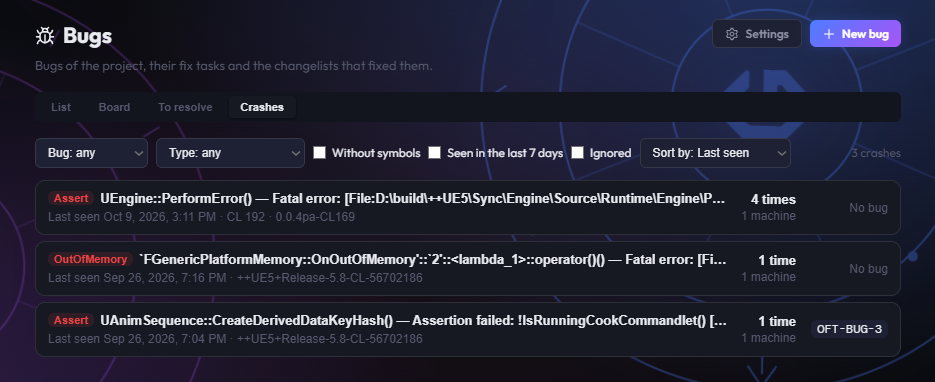
Each package is read on arrival. Gameheim keeps the error message, the callstack, the engine and build version, the platform and the build configuration, and stores the minidump with the end of the game log for 90 days. Reports of the same crash are grouped, counted and shown in the Crashes view of the bug tracker, where you can turn a crash into a bug. When your plan includes AI, a new crash also gets a short explanation of its callstack: what happened, the probable cause and where to look first. How grouping and the explanation work is covered in Unreal Engine crash report triage.
Setup is done once per project in Bugs > Settings > Unreal crashes:
- Receive crashes turns reception on and creates the project key.
- The two ini lines to copy, already filled in with your address and key, or Apply with the agent to have the Gameheim agent write them into your workspace for you.
- Regenerate key if a build carrying the key has left the studio.
- Test mode: keep packages as received, to see exactly what a crash sends before you rely on it.
- Also send editor crashes to Epic, Record who had the crash (editor only) and Drop crashes from Shipping builds, three optional switches, all off by default. The first two are explained in Unreal Editor crash reports.
The build side stays the same whichever receiver you use: the ini line, the crash reporter in the package and the debug files are Unreal settings. What changes is everything after the upload:
| Step | By hand | In Gameheim |
|---|---|---|
| Somewhere to send reports | Run a service that accepts CrashReportClient uploads and unpacks them | A project address and key, created by Receive crashes |
DataRouterUrl in DefaultEngine.ini | Edit the file, then submit or commit it | Copy the ready lines, or Apply with the agent prepares the change for you to submit |
| Crash reporter and debug files in the package | Project settings or -CrashReporter, .pdb next to the executable | The same: these are packaging settings |
| Changelist or commit of each crash | Stamp it into the Project Version | Read from the Project Version; for editor crashes, taken from the workspace through the agent |
| A build with the address leaves the studio | Change the address in the ini and rebuild | Regenerate key stops the old key at once; new builds take the new lines |
| Old minidumps | Clean up storage yourself | Deleted after 90 days; reports and counts stay |
How to set up Unreal Engine crash reporting in Gameheim
The steps follow the path of a crash: turn on reception, tell the engine where to send, package the crash reporter and the debug files, then crash on purpose to check that everything arrives.
- A Gameheim project for your Unreal Engine game, with the bug tracker in use.
- The permission to manage the bug tracker (LEAD and ADMIN have it) to open the bug settings.
- Write access to
Config/DefaultEngine.iniof the game project in Perforce or Git. - Optional, for Apply with the agent: the Gameheim agent version 1.0.2 or later, online, and the permission to change your workspace (Perforce checkout, or Git commit).
Turn on crash reception
Open Bugs, select the project, click Settings and scroll to the Unreal crashes section. Switch on Receive crashes. Gameheim creates the project key and shows the lines to add to your project, with the date the key was created.
While reception is off, a build that carries the key gets no answer and its reports are not kept. You can switch it off at any time, for example during a crunch week when you only want the crashes of one branch.
Add DataRouterUrl to DefaultEngine.ini
Copy the lines with Copy and add them to
Config/DefaultEngine.iniConfig/DefaultEngine.iniof the game project (the file next to your.uproject, not the engine's own config). They look like this, with your Gameheim address and your project key:[CrashReportClient] DataRouterUrl="https://<your Gameheim address>/api/crash-ingest/<project key>"If the file already has a
[CrashReportClient]section, put theDataRouterUrlline inside it rather than creating a second section, and make sure there is only oneDataRouterUrlline: when a key appears twice, the value read last wins, so a forgotten old line can silently redirect reports. Then submit or commit the file: builds made from a workspace without it will not send anything.Tip:The line also applies to the Unreal Editor when it runs this project: editor crashes then go to Gameheim instead of Epic. See Unreal Editor crash reports for what that means and how to keep Epic informed.Include the crash reporter in the package
A packaged game only reports crashes if CrashReportClient is packaged with it. When you package from the editor, turn on Include Crash Reporter in Project Settings > Packaging (you may need to expand the advanced options of the section to see it).
The editor saves both packaging switches in
Config/DefaultGame.iniConfig/DefaultGame.ini, so you can check them in version control. With both on, the section contains:[/Script/UnrealEd.ProjectPackagingSettings] IncludeCrashReporter=True IncludeDebugFiles=TrueWhen you package from the command line or a build machine with
Example BuildCookRun command (Windows)RunUAT BuildCookRun, add-CrashReporterto the command. In our tests the project setting alone did not bring CrashReportClient into a command-line package: the game crashed, no window appeared and nothing was sent.RunUAT.bat BuildCookRun -project="C:\Work\MyGame\MyGame.uproject" -platform=Win64 -clientconfig=Development -build -cook -stage -pak -archive -archivedirectory="C:\Builds\MyGame" -CrashReporterImportant:This is the step that fails silently. A package without CrashReportClient still crashes normally, it just never reports. The quickest check: after a test crash, a crash reporter window should appear. If it does not, the reporter is not in the package.Ship the debug files with QA builds
Function names in the callstack come from the debug symbol files (
.pdbon Windows). CrashReportClient resolves them on the machine that crashed, using the files that sit next to the executable. Without them the report only has module names and offsets.- For a Development package, check that the
.pdbfiles are present in the packagedBinariesfolder next to the executable. If your script passes-nodebuginfoto BuildCookRun, remove it for QA builds. - For a Shipping package, debug files are only staged when Include Debug Files in Shipping Builds is on in Project Settings > Packaging.
- For the editor installed from the Epic Games Launcher, install Editor symbols for debugging in the launcher (Library, the arrow next to your engine version, Options). It is a large download, but without it editor callstacks have no function names.
Also keep a copy of the
.pdbfiles of every build you hand to QA, filed under its build name or changelist. A minidump can only be read with the exact symbols of the build that produced it: rebuilding the same changelist later does not give matching files. The archive folder produced by-archiveis a good place to take them from.Keep debug files inside the studio. They make reverse engineering easier, which is one more reason to use crash reception for internal builds only.
- For a Development package, check that the
Write the changelist into the Project Version
The report does not carry your game's changelist by itself. Gameheim reads it from the Project Version (Project Settings > Project > Description > Project Version) when it contains
Config/DefaultGame.iniCLfollowed by the number, for example0.4.0-CL18342. The Project Version is stored inConfig/DefaultGame.ini:[/Script/EngineSettings.GeneralProjectSettings] ProjectVersion=0.4.0-CL18342Nobody should type this by hand. Let your packaging script stamp it before BuildCookRun runs, for example with the changelist the build workspace is synced to (
p4 changes -m1 "//...#have"from the workspace root), and restore the file afterwards. With the changelist in place, Gameheim can tell an old build from a new one and reopen a fixed bug when its crash comes back. The details are in changelist attribution.On a Git project, stamp the commit instead: Gameheim reads it when the Project Version contains
Config/DefaultGame.ini (Git)GIT-followed by the commit hash, short (7 characters or more) or full, for example0.4.0-GIT-a1b2c3d.git rev-parse --short HEADin the build checkout gives the value to write. Each report then shows the commit of the build it came from.[/Script/EngineSettings.GeneralProjectSettings] ProjectVersion=0.4.0-GIT-a1b2c3dCrash on purpose to test the setup
Start a packaged Development build, open the console with the tilde key (~) and type
debug crash. The game stops, the crash reporter window appears, and after you send the report a new group shows up in Bugs > Crashes within a few seconds.Then try
debug ensure. An ensure is a non-fatal check: the program keeps running and no window appears. In our tests in Play In Editor the report was sent in the background and arrived within a few seconds. It lands in a separate group, filed as an ensure, and does not send a notification.- A crash in Play In Editor (PIE) crashes the whole editor. It arrives as an editor crash, with editor module names, not as a game crash.
- A Shipping build has no console, so
debug crashis not available there. Test with a Development build. - Recent engine versions report
debug crashas a fatal error, so the group type may read Assert rather than Crash. That is expected.
Troubleshooting: Unreal crash reports not arriving
Work through the chain from the crashing machine to Gameheim. The first check that fails is usually the answer.
| What you see | Likely cause | What to do |
|---|---|---|
| The game crashes and closes, no crash reporter window | CrashReportClient is not in the package | Turn on Include Crash Reporter, or add -CrashReporter to BuildCookRun, and package again. The crash data is still written locally in the Saved/Crashes folder of the game. |
| The window appears, nothing arrives in Gameheim | DataRouterUrl missing from the build, wrong section, or an old key | Check that the lines are in Config/DefaultEngine.ini under [CrashReportClient], that the change was submitted before the build was made, and that the key matches the one shown in Unreal crashes. |
| Nothing arrives, even from new builds | Receive crashes is off | Switch it on. While it is off, reports get no answer and are not kept. |
| Crashes from Shipping builds never arrive | Drop crashes from Shipping builds is on | That is what the switch does: Shipping reports are discarded on arrival and nothing is kept. Test with Development builds. |
| Editor crashes arrive, packaged game crashes do not | The package has no crash reporter, or was built before the ini change | See the first two rows. The editor always has CrashReportClient; a package only has it when you include it. |
| Some reports from one machine are missing | Too many reports in one minute | Reception accepts 10 reports per minute from one network address and 60 per minute per project. A whole office behind one internet connection counts as one address. A test loop that crashes faster than that loses reports, and the engine does not retry. |
| Nothing arrives from a studio network, it works from home | Outbound HTTPS blocked by a proxy or firewall | Allow outbound HTTPS from test machines to your Gameheim address. |
Without a receiver to look at, the only local evidence is on the crashing machine: each crash leaves a folder under Saved/Crashes with the context file, the log and the minidump, whether or not the upload worked. If that folder is there and nothing arrived, the problem is between the machine and the address.
Callstack shows no function names
A crash group marked no symbols means the report arrived with modules and offsets only, for example MyGame 0x00007ff6a2c10000 + 1e98bc, instead of lines like MyGame!AMyCharacter::Fire() [MyCharacter.cpp:212].
- Editor crash: the engine symbols are not installed. Install Editor symbols for debugging from the Epic Games Launcher. An editor built from source has its symbols already.
- Packaged game: the
.pdbfiles were not next to the executable when it crashed, or CrashReportClient was missing, so nobody resolved the addresses. Check both.
Groups without symbols still work, with one limit: an offset only means something inside one build, so the same crash in the next build opens a new group and cannot be tracked as a regression. The minidump is kept for 90 days, so a programmer with the matching symbols can still open it in Visual Studio.
CrashReportClient not included in the package
The project setting and the command-line flag are two separate switches. Include Crash Reporter is read when you package from the editor. A build machine calling BuildCookRun directly needs -CrashReporter on the command line. If your studio has a packaging batch file or a CI job, add the flag there once and every build will carry the reporter.
You can confirm it without crashing: a package with the reporter contains a CrashReportClient executable in its engine binaries folder.
Crash reception limits
| Limit | Value |
|---|---|
| Reports per minute, per project key | 60 |
| Reports per minute, per network address | 10 |
| Size of a package as sent | 20 MB |
| Size of a package once decompressed | 100 MB |
| Minidump and end of the game log kept | 90 days |
| End of the game log kept per report | last 256 KB |
| Reports kept per crash group | last 100 (the count keeps growing) |
| Test mode packages | up to 10 per project, 7 days |
Minidumps and logs count towards your organization's storage. When storage is full, reports are still accepted and grouped, only without the minidump and the log, and the report says so.
Frequently asked questions
What is DataRouterUrl in Unreal Engine?
DataRouterUrl is the address CrashReportClient uploads crash reports to. You set it in the [CrashReportClient] section of your project's Config/DefaultEngine.ini. Without it, a packaged game sends its crashes nowhere, and the launcher editor sends them to Epic. Pointing it at a self-hosted receiver, such as the project address Gameheim gives you, keeps the reports of your internal builds in one place your team can triage.
Is Include Crash Reporter enough when packaging from the command line?
Not in our tests. Include Crash Reporter in Project Settings covers packaging from the editor. When a script or build machine runs RunUAT BuildCookRun, add -CrashReporter to the command, or the package can ship without CrashReportClient. The game then crashes without showing a crash reporter window and sends nothing. Checking for that window after a test crash is the fastest way to confirm it.
Do I need debug symbols for crash reports?
Reports arrive without them, but the callstack only shows module names and offsets, and the same crash in a new build becomes a new group. With the .pdb files next to the executable, CrashReportClient writes function names into the report. For the launcher editor, install Editor symbols for debugging. Keep debug files in internal builds only.
How do I test Unreal crash reporting without a real bug?
Open the console in a Development build with the tilde key and type debug crash. The game stops, the crash reporter window appears, and the report should show up in Gameheim under Bugs > Crashes within seconds. debug ensure sends a non-fatal report in the background while the program keeps running. Shipping builds have no console, so test with Development.
Can players send crash reports to Gameheim?
Crash reception is designed for the editor and for internal builds used by the team and QA. The address in the ini is not a secret, so do not ship it in builds for players or external testers. If a build with the key leaves the studio, use Regenerate key: the old key stops working at once. Drop crashes from Shipping builds adds a second safety net.