Unreal Engine source control: Perforce vs Git LFS, and how to choose
For leads and founders who are setting up source control for an Unreal Engine project, or wondering whether the one they have still fits. You get what makes game projects different from ordinary software, a side by side comparison of Perforce and Git LFS, the questions that decide between them, and the setup steps that matter whichever you pick. The last section shows where Gameheim fits on top of either one.
Why source control for Unreal Engine is different
Source control keeps every version of a project and lets a team work on it at the same time. For ordinary software that is a solved problem: files are text, they are small, and two people who edit the same file get their lines merged. Game development breaks all three assumptions, whatever the engine, and an Unreal Engine project breaks them more than most.
- Most of the project is binary. Meshes, materials, Blueprints and levels are
.uassetand.umapfiles. They cannot be read as text and cannot be compared line by line. - Binary assets cannot be merged. If two people change the same Blueprint, one of the two versions has to be thrown away. The only protection is to make sure one person edits each asset at a time, which means locking.
- The project is large and grows fast. Textures, audio and levels reach gigabytes, and every saved version is a new copy. A system that hands every version of every file to every machine stops being usable.
- Half the team does not write code. Artists, level designers and animators change more files than programmers do, and they have no reason to learn a command line first.
So the question for a game team is narrower than "which version control system is best". It is: which system stores large binary files well, enforces locks on them, and can be used every day by people who are not engineers. Two systems cover almost every Unreal team: Perforce, and Git with the Git LFS extension.
Perforce vs Git LFS for Unreal Engine: which one to choose
Both systems run shipped Unreal games. They start from different models, and the differences below follow from the model, not from the quality of either tool.
| Perforce | Git + Git LFS | |
|---|---|---|
| Model | Centralized: the server holds the history, each person syncs the revisions they need | Distributed: each clone carries the history of the text files, LFS keeps large files on a server |
| Large binary files | Stored by the server as they are, no extra setup | Through LFS, for the patterns listed in .gitattributes |
| Locking | Exclusive checkout by file type, enforced by the server | lockable files plus git lfs lock, if the host supports the LFS locking API |
| Working on part of the project | The workspace view maps only the folders you need | Possible with sparse checkout and LFS fetch filters, with more setup |
| Branching | Streams and branches kept on the server | Light local branches; binary assets still cannot be merged between them |
| Hosting | A Perforce server your studio runs or has hosted | Any Git host with LFS, such as GitHub, GitLab, Azure DevOps, Gitea or Bitbucket |
| Unreal Editor | Built-in provider, and the system Epic uses for the engine itself | Built-in Git provider marked as beta; check what it covers in your engine version |
| Daily use by non-programmers | Sync, check out, submit: few ideas, strict rules | Pull, stage, commit, push, plus locking as a separate habit |
Licensing and hosting costs differ between the two and change over time, so compare the current terms of Perforce and of your Git host for your team size and storage instead of relying on an old comparison.
Perforce usually fits when
- Most of the daily changes are binary content made by artists and designers.
- The project is content-heavy and will keep growing for years.
- You want the server to refuse a second edit on a locked asset, with no discipline required from the team.
- People need only a part of the project on their disk.
- Someone in the studio can look after a server, or you use a hosted one.
Git LFS usually fits when
- The team is small and mostly programmers who already work in Git.
- The project is code-heavy, with a modest amount of binary content.
- You already have a Git host, reviews and build pipelines you want to keep.
- Your host supports LFS locking and the team is willing to lock before editing.
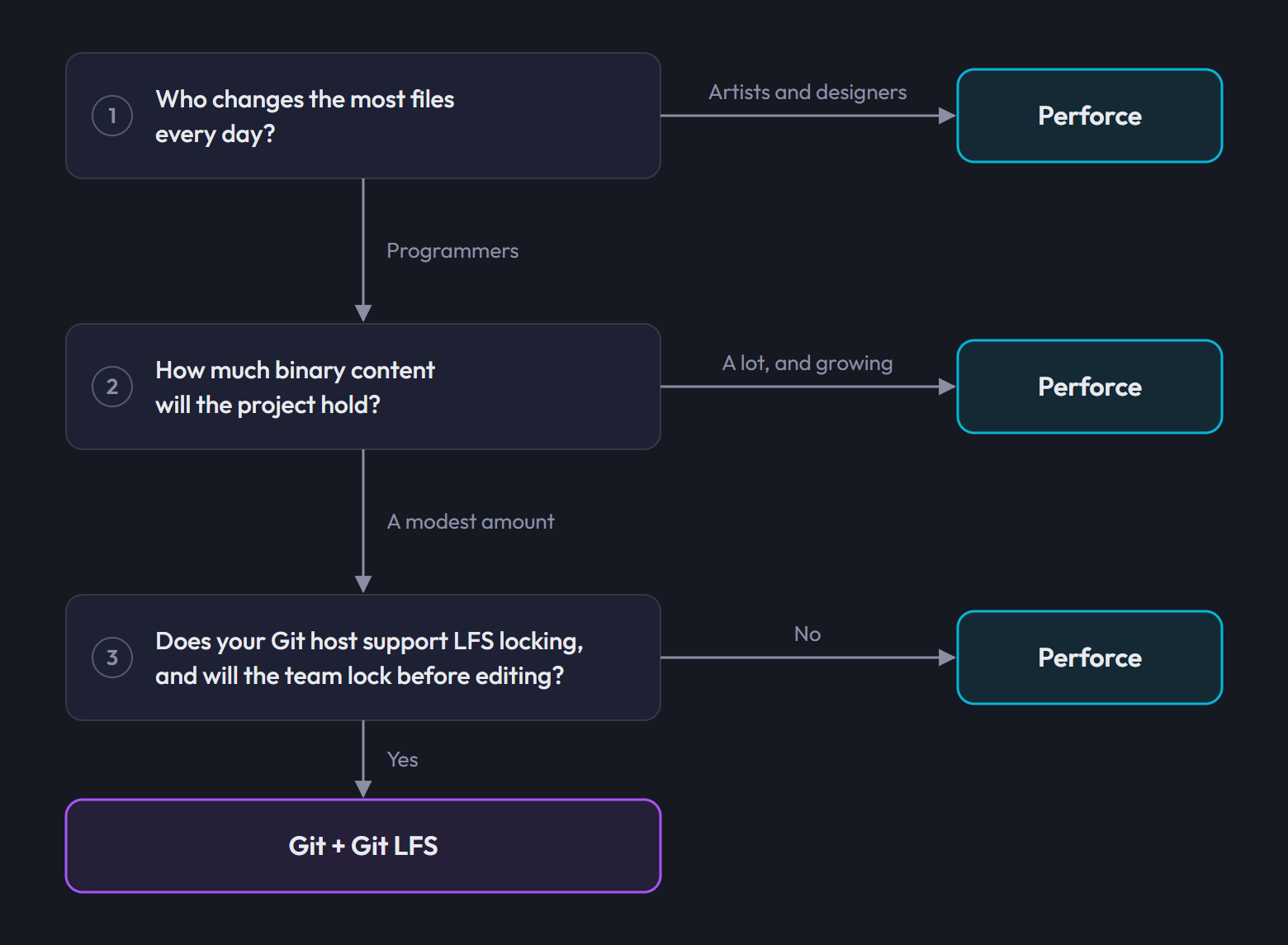
If the answers point both ways, let the binary content decide: it is the part of the project that neither system can merge for you, and the part that grows.
They are not the only options. The editor also ships providers for Subversion and for Unity Version Control (formerly Plastic SCM), and newer hosted services such as Diversion exist. Perforce and Git LFS are the two this guide covers because they are the two most Unreal teams end up choosing between.
How to choose and set up source control for an Unreal project
Decide before the first asset is committed. Moving a project from one system to the other later is possible, but it costs history, time and a freeze for the whole team.
- An Unreal Engine project, new or existing.
- For Perforce: a Perforce server your team can reach, and a user account on it for each person.
- For Git: a remote on a Git host that supports Git LFS, and access to it for each person.
Answer three questions about your team
- Who changes the most files? If it is artists and designers working on binary content, enforced locking matters more than branching.
- How large will the project get? A code-heavy prototype and a content-heavy production put very different loads on the system.
- What does the team already know and run? An existing Git host with build pipelines, or an existing Perforce server, is a real cost to walk away from.
Choose Perforce or Git LFS
Hold your three answers against the comparison and the two lists above. Write the decision down together with the reason: in a year someone will ask why, and "we already had it" is a legitimate answer.
Set up locking before the first asset
On Perforce, give
.uassetand.umapthe exclusive checkout file type through the server typemap, so checking a file out is what locks it. See Perforce typemap for Unreal Engine. On Git, commit a.gitattributesthat sends those files to LFS and marks themlockable, and check that your host supports the LFS locking API. See Git LFS for Unreal Engine.Important:Both settings apply to files added afterwards. Assets committed before the rule existed keep their old type, and fixing them later means re-typing files on Perforce or rewriting history on Git.Keep generated folders out
Unreal rebuilds
Intermediate/,Saved/andDerivedDataCache/on every machine. Exclude them from the start, with.p4ignoreon Perforce or.gitignoreon Git. Decide onBinaries/as a team: leave it out when everyone compiles locally, keep it when artists need the editor binaries without building them.Connect the Unreal Editor
The editor can talk to your source control system directly: it checks assets out when you edit them, shows their state in the Content Browser and submits from inside the editor. Epic documents the Perforce setup in Using Perforce as Source Control for Unreal Engine. Set it up on one machine first, then write down the settings for the rest of the team.
Walk the non-programmers through one full day
Source control fails when part of the team works around it. Sit with an artist for one loop: get the latest version, take the asset, save, publish. On Perforce that loop is described in Perforce for artists and designers.
Common source control mistakes in Unreal projects
- Committing generated folders.
Intermediate/,Saved/andDerivedDataCache/are rebuilt on every machine. In the repository they only add size and conflicts. - Adding assets before locking is configured. The first weeks of content end up with the wrong file type, and two people overwrite each other before anyone notices.
- Using plain Git for content. Without LFS, every version of every asset is in every clone, and cloning the project soon takes hours.
- Making files writable instead of checking them out. The edit happens behind the server, without the lock that protects it.
- Holding a lock for days. Nobody else can work on that asset. Release what you are not changing.
- Leaving the artists out. If only programmers use source control, the content, which is most of the game, has no history and no backup.
Where Gameheim fits: Perforce and Git from the browser
Gameheim does not replace your source control system. It sits on top of the one you chose and puts the daily operations in a browser page that the whole team can use, next to the tasks and bugs of the same project. A project uses one system or the other, chosen when it is created: System offers Perforce (Helix Core) and Git + Git LFS (the Git option appears only where Git is available on the server). A Perforce project can later move to Git, and back, with a guided transition: see move a project from Perforce to Git.
- On Perforce, the P4 Workspace page covers sync, check out, lock, reconcile, shelve and submit. A submit can be linked to the tasks it completes, the Lock Dashboard shows the whole team who holds which asset, and locks held for more than 24 hours are marked stale and the holder is reminded. This is the more complete integration.
- On Git, the Git Workspace page covers clone, fetch, pull, push, stage, commit, branches, history and the patterns tracked by LFS. Git support is experimental: locking a file is still
git lfs lock, and diffs and conflicts are handled with Git itself. - Everything above source control (tasks, bugs, wiki, capacity, roles) works the same way on both.
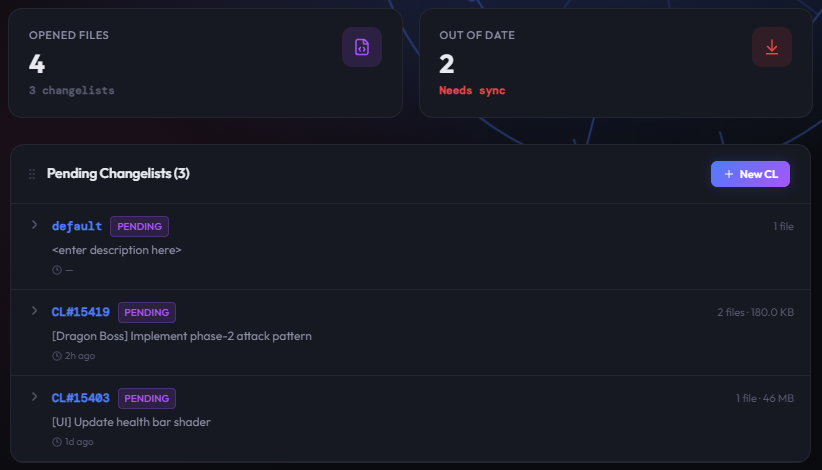
In both cases the commands run on your own computer through the Gameheim Agent, with your own account. The browser sends a request, the agent runs the command against your server or Git host, and the result comes back to the page. File contents travel between your machine and your server, not through Gameheim.
It does not compete with the editor integration either: a file checked out in Gameheim is checked out in Perforce, and a submit from Gameheim is a normal submit that shows up in every other tool your studio uses. You can keep checking assets out from the editor while you work, and use the browser for syncing, reviewing what changed, team locks and submitting with the task attached.
Connecting a project
- Create a project and set System to the one you chose. See Getting started with Gameheim.
- Each person installs the Gameheim Agent once. See Install the Gameheim Agent.
- On Perforce, save your account with P4 Credentials and choose or create a workspace with Manage Workspace (Perforce workspace setup for Unreal Engine). On Git, enter your token in Git credentials and click Configure & clone (Git LFS for Unreal Engine).
Frequently asked questions
What source control does Unreal Engine use?
Unreal Engine works with several systems. The editor has built-in providers for Perforce, Git, Subversion and Unity Version Control. Epic develops the engine itself on Perforce, which is why Perforce is the most common choice for Unreal productions, while smaller and code-heavy teams often use Git with Git LFS.
Is Perforce or Git better for Unreal Engine?
It depends on the team. Perforce fits content-heavy projects where artists change large binary assets every day, because the server stores them directly and enforces exclusive checkout. Git with Git LFS fits small, code-heavy teams that already work in Git and whose host supports LFS locking. Neither can merge two versions of a .uasset.
Can I use Git without LFS for an Unreal Engine project?
Only for a very small project. Plain Git keeps every version of every file in every clone, and Unreal content is binary and changes often, so the repository grows quickly. Git LFS stores the large files on a server and keeps small pointers in Git. Set it up before the first asset is committed.
Is revision control the same as source control in Unreal Engine?
Yes. Recent Unreal Engine 5 versions label the feature Revision Control in the editor, where older versions said Source Control. The function is the same, and both mean what other tools call version control: tracking every version of the project files and coordinating a team that works on them.
Do artists and designers need source control?
Yes, more than anyone. Most of an Unreal project is content, and content cannot be merged, so the people who make it are the ones who lose work when two edits collide. Source control gives them locks, history and a way back from a broken asset. The hard part is the vocabulary, which is why a plain interface matters.
Can I switch from Git to Perforce later?
You can, but plan it as a migration: history has to be imported or left behind, every machine sets up a new workspace, and work stops while it happens. That is the reason to decide before the first asset is committed, and to let the binary content, not the code, drive the decision.